Understanding Product Assumptions in Decision Critical
Products assumptions are the foundation for building any business model within Decision Critical. They define the products and services you offer, acting as the building blocks for simulating your business operations and financials.
Why are Product Assumptions Important?
There are several reasons why defining product assumptions accurately is crucial:
- Understanding Revenue Streams: By specifying the products you sell and their prices, Decision Critical can model your income generation. This allows you to analyze how changes in pricing or product mix might impact your overall revenue.
- Accurate Production Planning: For manufactured goods, product assumptions provide insights into the resources and processes needed for production. This helps ensure you have the necessary materials, labor, and equipment to fulfill customer demand.
- Optimized Inventory Management: Understanding what products you have and their demand patterns allows Decision Critical to recommend optimal inventory levels. This can minimize stockouts and excess inventory holding costs.
- Profitability Analysis: Associating costs with products allows Decision Critical to calculate product profitability. This helps you identify your most profitable offerings and make informed decisions about product development and marketing strategies.
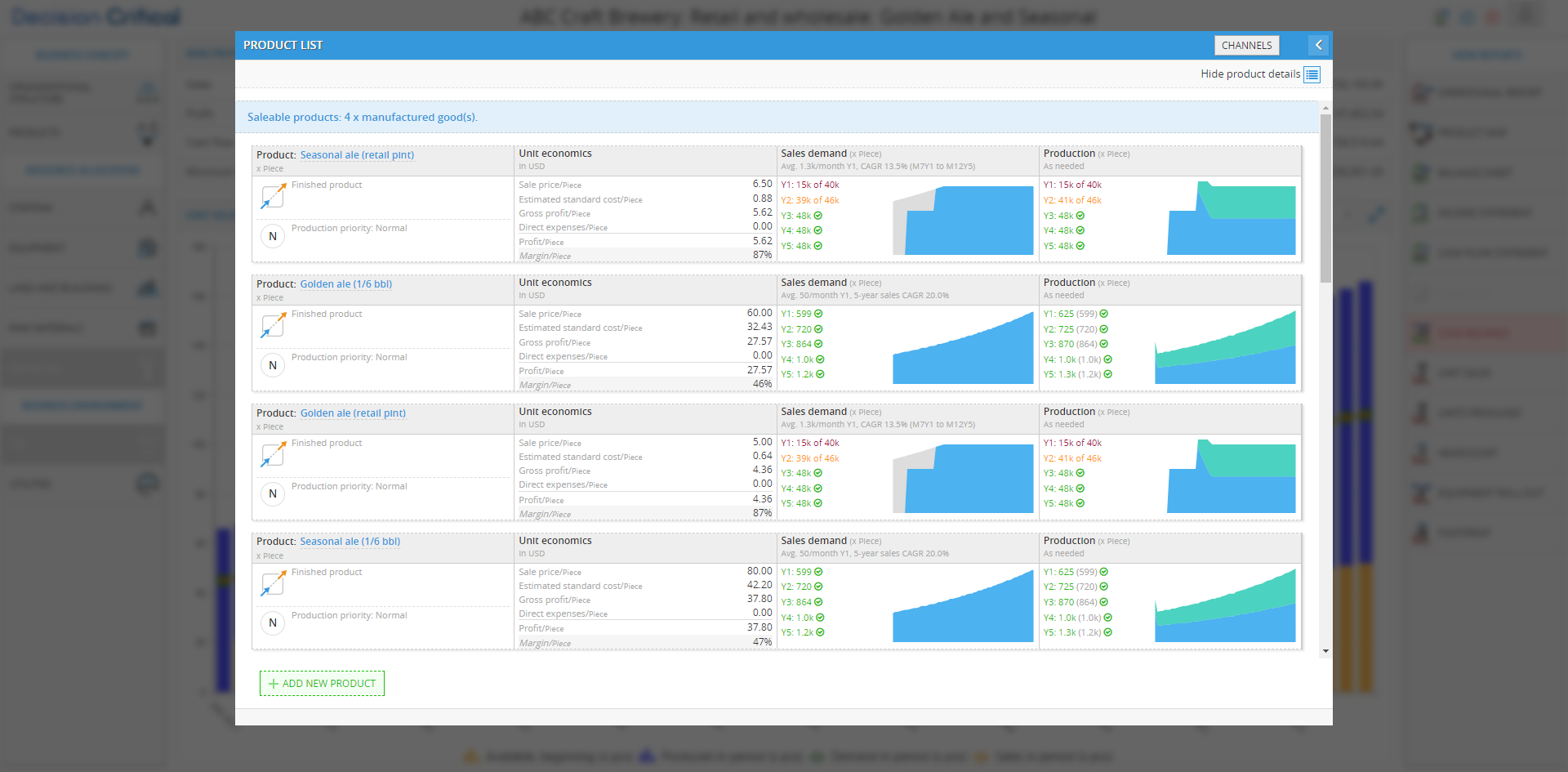
Product Categories in Decision Critical:
Decision Critical likely offers various product categories to cater to different business models. The categories are now included:
- Services: This category covers non-physical offerings delivered to customers. It can include basic services, virtual services delivered electronically, and subscription services with recurring billing.
- Traded Goods: These are products you purchase from suppliers and resell without significant modification. Examples include office supplies or clothing.
- Manufactured Goods: This category covers products created through internal or outsourced production processes. It can include basic manufactured goods you assemble yourself or outsourced manufactured goods obtained from external suppliers.
- Semi-finished Products: These are intermediate products used internally to manufacture more complex goods. They can be basic, outsourced, or even aged (e.g., wine) requiring specific storage before use.
Additional Considerations:
The terminology and specific options within Decision Critical might vary slightly depending on the software version. It's always recommended to refer to the user documentation for the latest and most accurate information.
By carefully defining your product assumptions in Decision Critical, you create a more realistic representation of your business and gain valuable insights into its performance and potential under various scenarios. This empowers you to make informed decisions about product pricing, resource allocation, and overall business strategy.
Building Your Products in Decision Critical
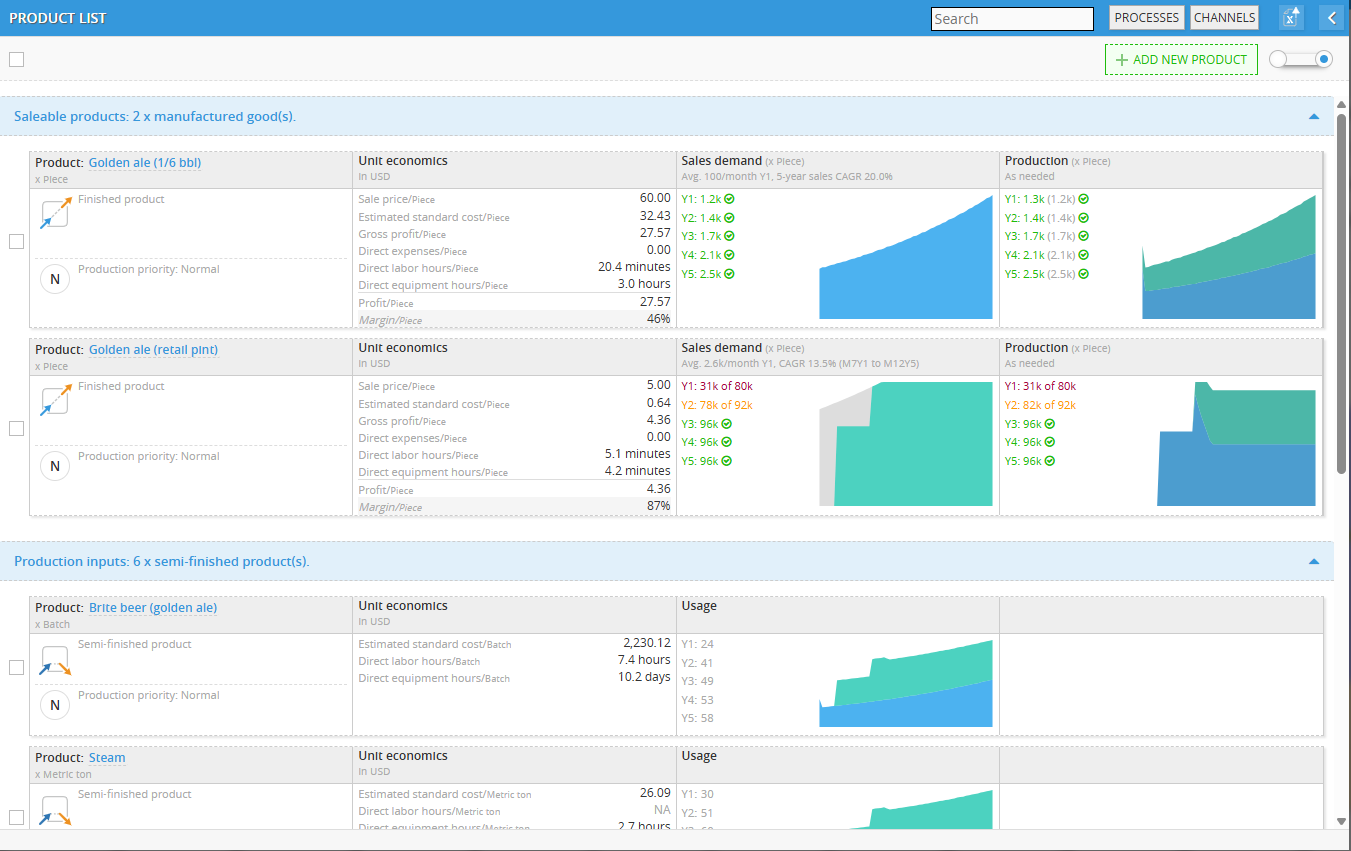
This section dives into the process of defining and modeling your products within Decision Critical. Here's a breakdown of the key steps involved:
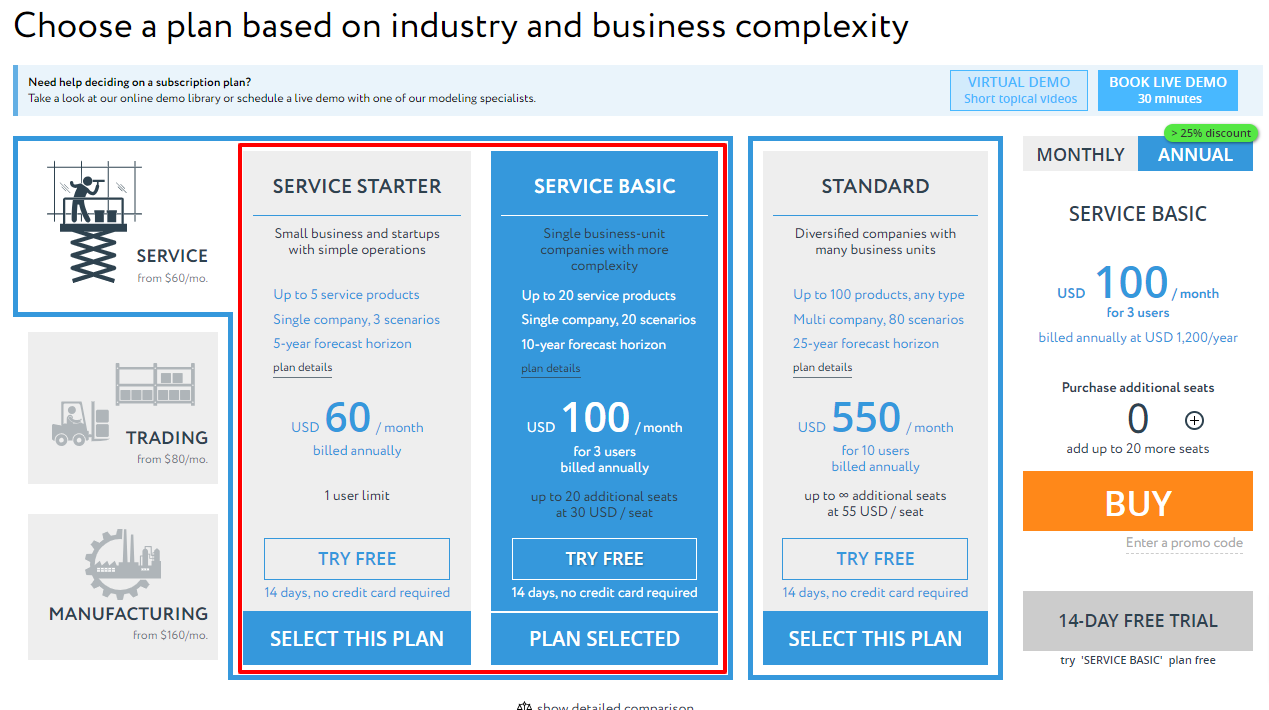
Before proceeding to this section, you may notice that you are unable to select certain categories, especially if you are a new or trial user. This limitation is due to your package, specifically if you choose a specific industry such as Service, Trading, or Manufacturing. In this case, you will only be able to create products within the industry you have selected. Only the standard plan allowing creation of any product category.
Choosing the Right Product Category:
The first step is to identify the most appropriate category for your product based on its characteristics. Decision Critical, as we discussed, offers various categories like:
- Service: For offerings that involve delivering a service to your customers (e.g., consulting, training).
- Basic Service
- Virtual Service
- Subscription Service
- Traded Goods: For products you purchase from suppliers and resell without significant modification (e.g., office supplies).
- Basic Traded Goods
- Basic Traded Goods
- Manufactured Goods: For products created through your internal production processes (e.g., assembled furniture). This might include a less common "Outsourced Manufactured Goods" category for recurring deliveries of manufactured items.
- Basic Manufactured Goods
- Outsourced Manufactured Goods
- Semi-finished Products: For intermediate products used internally to manufacture more complex goods (e.g., engine components). This category can further be divided into Basic, Outsourced (obtained from external suppliers), and Aged (requiring storage before use).
- Basic Semi-finished Products
- Outsource Semi-finished Products
- Aged Semi-finished Products
Defining Product Details:
Once you've chosen the category, you'll need to provide specific details about your product in Decision Critical, we will do this in Product card which will have various settings depends on product category
So, we have written an article specifically dedicated to the process of building these products individually. If you are interested, you can find it in the "Help section" under the category of "Building Your Assumptions". (Link)
Service product (Definition, Key characteristics and Subtypes explanation)
Services are intangible or semi-tangible offerings that your company delivers to customers. They are not physical products but rather involve applying your resources (labor, equipment, expertise) to create value for clients. Decision Critical allows you to model these services to understand their impact on your business and optimize your service delivery processes.
Key Characteristics of Services:
- Intangible or Semi-tangible: Services are not physical products that you can hold. They involve delivering a performance or applying knowledge for the benefit of the customer. Think of consulting services, training programs, or software as a service (SaaS).
- Produced with Company Resources: You utilize your resources like skilled personnel, equipment, intellectual property, and facilities to deliver the service.
- Sold to Customers: Services generate revenue when you sell them to clients through various channels.
Service product's subtypes:
1. Basic service
- This is the most general category for services offered directly to customers, requiring company resources like labor and equipment. It's suitable for services with a one-time delivery or completion, like consulting projects, repairs, or maintenance contracts.
Basic service Product type in decision critical is defined as intangible or partially-tangible services rendered via processes performed by personnel and / or equipment.
Imagine a service like getting a haircut. It's not a physical product you can hold, but it's a service a person (the stylist) performs using tools (scissors, clippers). This is a simple service - intangible (the haircut itself) or partially tangible (using equipment) delivered through skilled people.
Read a completed guide (step-by-step) here Basic service
2. Virtual service
- This subcategory is ideal for intangible services delivered electronically or online, often with minimal reliance on physical resources. Examples include software subscriptions with ongoing access, online courses, or cloud-based services.
Virtual service Product type in decision critical is defined as service products that do not require significant use of labor or equipment in order to support ongoing production and sale. Generally used for electronic products for which processes have been fully-automated and which do not involve acquisition of physical inventory.
Imagine a service like music streaming. You access a vast library of songs instantly, without needing a physical CD or someone to hand-deliver it. This is a virtual service - it's delivered electronically, doesn't require ongoing physical equipment use, and uses automated processes (like servers and software) to function. There might be some labor involved behind the scenes (maintaining the service), but it's not the main way you experience it.
Read a completed guide (step-by-step) here: Virtual service
3. Subscription service
- This category caters to services with recurring billing and delivery, typically at fixed intervals. It's suitable for services like monthly software subscriptions, magazine subscriptions, or recurring maintenance plans.
Subscription service Product type in decision critical is defined as intangible or partially-tangible services rendered via processes performed by personnel and/or equipment.
Think of a service like Netflix. Instead of buying individual movies, you pay a monthly fee (subscription) for access to a library of content. Netflix offers different subscription levels ("packages") with varying prices and features (e.g., HD quality, simultaneous streams). You can manage your subscription, including upgrades, downgrades, and free trials, all within your account.
Read a completed guide (step-by-step) here: Subscription service
Traded Goods (Definition, Key characteristics and Subtypes explanation)
Traded goods are physical products that you buy and sell without significantly modifying them. They are purchased from suppliers, held in inventory, and then sold to your customers through various channels. Decision Critical allows you to model these products and their associated processes to gain insights into your inventory management, sales performance, and overall business health.
Key Characteristics of Traded Goods
- Physical Products: These are tangible items that you can hold and store in a warehouse or retail location.
- Bought and Sold: You purchase traded goods from suppliers and then resell them to your customers.
- Inventory Management: You need to manage the stock levels of traded goods to ensure you have enough to meet customer demand without incurring excessive storage costs.
- No Manufacturing Involved: Unlike manufactured goods, traded goods are not created through your internal production processes.
Traded goods's subtypes:
**Currently, Decision Critical offers only basic traded goods options
1. Basic traded goods
- Traded goods are physical products that your business buys and sells without significantly modifying them. They are purchased from suppliers, held in inventory, and then sold to your customers through various channels.
The subscription service Product type in decision critical is defined as buy-and-sell trading (For enterprises that carry inventory and conduct wholesale, online or retail trading)
Imagine a store that sells things you can hold, like clothes or groceries. These are "basic traded goods" because they involve buying and selling physical products (inventory). The store can sell these products wholesale (to other businesses), online (through a website), or directly to customers in a retail setting (like a physical store).
Read a completed guide (step-by-step) here: Basic Traded Goods
Manufactured goods (Definition, Key characteristics and Subtypes explanation)
Manufactured goods are physical products created through your internal production processes or by leveraging outsourced resources. Decision Critical allows you to model these goods, considering production processes, resource utilization, and sales channels to gain insights into your manufacturing efficiency and overall business performance.
Key Characteristics of Manufactured Goods
- Physical Products: These are tangible items your company produces or has produced for you.
- Company or Outsourced Resources: Production utilizes your internal labor, equipment, and facilities, or involves outsourcing some or all aspects to external suppliers.
- Inventory Management: You manage the stock levels of both finished manufactured goods and the raw materials required for production.
- Production Planning: You need to plan production schedules to meet customer demand while considering factors like resource availability and lead times.
Manufactured goods's subtypes
**Currently, Decision Critical offers only basic and outsourced manufactured goods options:
1. Basic manufactured goods
- These are products created entirely through your internal production processes, utilizing your own labor, equipment, and materials.
The basic manufactured goods Product type in Decision Critical is defined as a product type that represents the creation of complete, finished products through an in-house manufacturing process. This process transforms raw materials into functional goods that are ready for end-user consumption.
Imagine you manufacture wooden chairs (finished products). These chairs are created through a manufacturing process that takes raw materials (wood planks, screws, etc.) and transforms them into a final product with a specific purpose - to provide seating.
Read a completed guide (step-by-step) here: Basic Traded Goods
2. Outsourced Manufactured Goods
- These are products created entirely through your internal production processes, utilizing your own labor, equipment, and materials.
The outsourced manufactured goods Product type in Decision Critical is defined as finished products manufactured by a third-party supplier using your raw materials. This differs from "Outsourced Semi-Finished Products" where the supplier also provides the materials.
Imagine you manufacture a specific type of bottled beverage (finished product). You might outsource the bottling process (labor and equipment) to a third-party manufacturer, but you provide them with your own custom recipe, ingredients, and bottles. The finished bottled beverage would be considered an "Outsourced Manufactured Good" in your production system.
Read a completed guide (step-by-step) here: Outsourced Manufactured Goods
Semi-finished products (Definition, Key characteristics and Subtypes explanation)
Semi-finished products are an essential component of manufacturing in Decision Critical. They are physical products created through internal or outsourced resources, but unlike manufactured goods, they are not sold directly to customers. Instead, they serve as intermediate components used in the production of more complex manufactured goods or even other semi-finished products.
Key Characteristics of Semi-finished Products
- Internal or Outsourced Production: Similar to manufactured goods, semi-finished products can be created through your own resources or obtained from external suppliers.
- Used in Production: They are not directly sold but become components used in the production of other manufactured goods or even other semi-finished products.
- Inventory Management: You need to manage the stock levels of both finished manufactured goods and the semi-finished products used within your production processes.
Semi-finished Products subtypes:
Currently, Decision Critical offers basic, outsourced and aged traded goods options
1. Basic semi-finished products
- These are intermediate products created entirely through your internal production processes, utilizing your own labor, equipment, and materials. (e.g., Engine components for a car)
The basic semi-finished Product type in Decision Critical is defined as the creation of physical goods through a series of distinct, sequential steps using raw materials. These goods are not yet final products but serve as building blocks for more complex finished products manufactured later.
Imagine you manufacture wooden furniture (finished products). The wooden boards you use to construct the furniture wouldn't be considered finished products themselves. These wooden boards are semi-finished products created through a basic manufacturing process.
Read a completed guide (step-by-step) here: Basic semi-finished products
2. Outsourced semi-finished products
- These involve outsourcing some or all aspects of production to external suppliers. You might source pre-made components or materials that require further processing in-house. (e.g., Pre-cut lumber for furniture)
The outsourced semi-finished Product type in Decision Critical is defined as semi-finished products that are not manufactured in-house but rather obtained from a third-party supplier through an outsourcing agreement. These goods serve as building blocks for your final assembly processes.
Imagine you manufacture bicycles (finished products). You might outsource the production of some components, like the bicycle frames, from a specialized manufacturer. These outsourced frames would be considered "Outsourced Semi-Finished Products" in your production process.
Read a completed guide (step-by-step) here: outsourced semi-finished products
3. Aged semi-finished products
- These are unique components that undergo a controlled aging period before being ready for use in your final production process. Unlike basic outsourced materials, these products require time as a key ingredient to develop their desired properties.
The aged semi-finished Product type in Decision Critical is defined as semi-finished products that require a controlled aging period as part of the production process. During this aging period, the product undergoes some transformation (e.g., chemical changes) to develop its desired characteristics.
Imagine you manufacture leather goods (finished products). Some types of leather, like cured cowhide, require a specific aging period to develop strength, texture, and other desirable properties. These uncured hides would be considered "Aged Semi-Finished Products" in your production process.
Read a completed guide (step-by-step) here: aged semi-finished products
Process List (Product list)
Updated in September 2026.
Managing Processes from the Product List
The PROCESSES button in the top-right header of the PRODUCT LIST opens the global operations directory for your scenario. Instead of jumping into individual product cards to inspect manufacturing bottlenecks, this modal serves as the master command center to audit, route, and price every transformation step across the entire product lineup.
Process List tab (Directory & Master Routing)
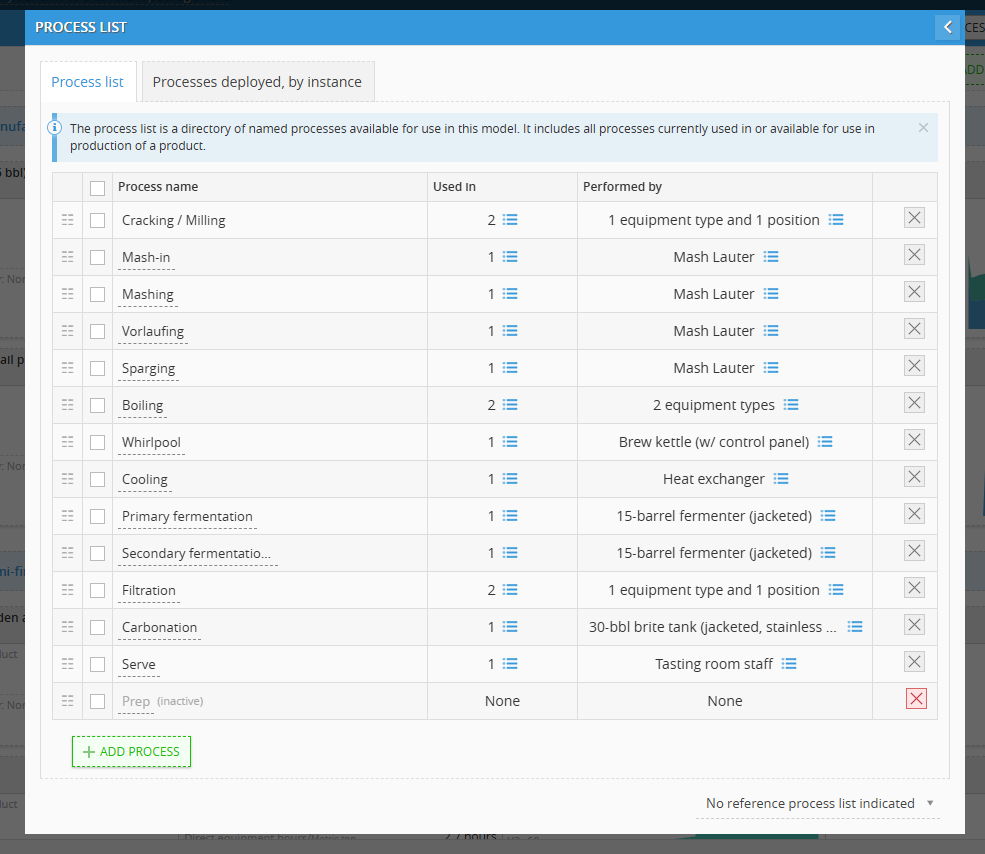
The Process list tab displays all named manufacturing and handling processes available to the model:
- Process name: The descriptive title of the operation (e.g., Cracking / Milling, Mashing, Vorlaufing, Cooling, Primary fermentation, Filtration, Serve).
- Used in: Indicates how many products or intermediate steps rely on this process (e.g., used in 1, 2, or None). Clicking the list icon reveals the linked parent items.
- Performed by: The primary resource—either machinery or labor—assigned to execute the step:
- Dedicated Asset: Shows specific equipment (e.g., Mash Lauter, Heat exchanger, 15-barrel fermenter).
- Multi-Resource: Flags operations requiring paired inputs (e.g., 1 equipment type and 1 position or 2 equipment types).
- Direct Labor: Shows staff roles operating without heavy machinery (e.g., Tasting room staff).
- + ADD PROCESS: Adds a new operation directly to the scenario's process directory.
- Reference Process List (KB Sync): The footer indicates whether rules and steps are synchronized with a master set from the Knowledge Bank (e.g., No reference process list indicated).
Manual Reordering (Drag-and-Drop)
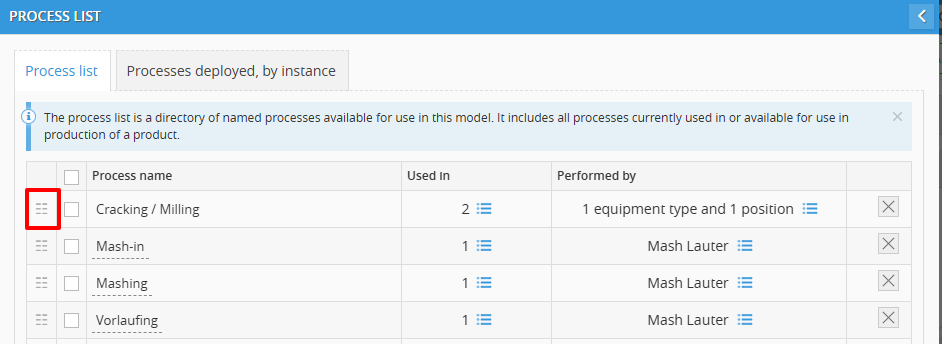
- Handle Icon: Each row in the Process list tab begins with a six-dot grid icon (⋮⋮) on the far-left border.
- Usage: Click and hold this handle to drag the process up or down to adjust its visual or sequential hierarchy within the directory.
Batch Actions
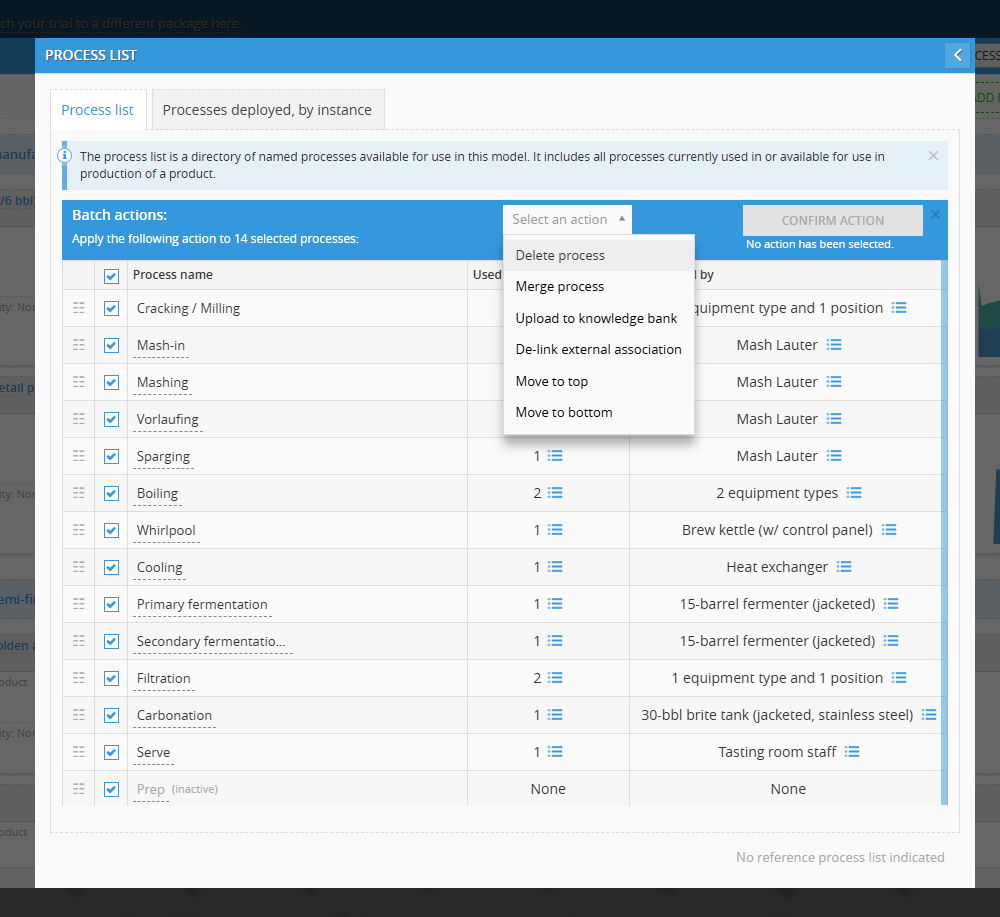
Selecting items activates the blue Batch actions management bar across the top of the table:
- Selection Scope:
- Select All: Check the master box in the table header to apply an action to all processes simultaneously (e.g., Apply the following action to 14 selected processes:).
- Specific Selection: Check individual tickboxes beside specific process names.
- Available Batch Actions:
- Delete process: Removes the selected processes from the scenario.
- Merge process: Combines multiple redundant processes into a single unified step.
- Upload to knowledge bank: Promotes the selected scenario processes into the centralized Knowledge Bank master library.
- De-link external association: Disconnects the selected steps from global master templates, turning them into standalone local instances.
- Move to top: Sends the selected entries directly to the top of the list.
- Move to bottom: Sends the selected entries directly to the end of the list.
- Confirmation: Select an action from the dropdown menu and click CONFIRM ACTION on the right side of the toolbar.
Processes Deployed, by Instance tab (Audit & Unit Costing)
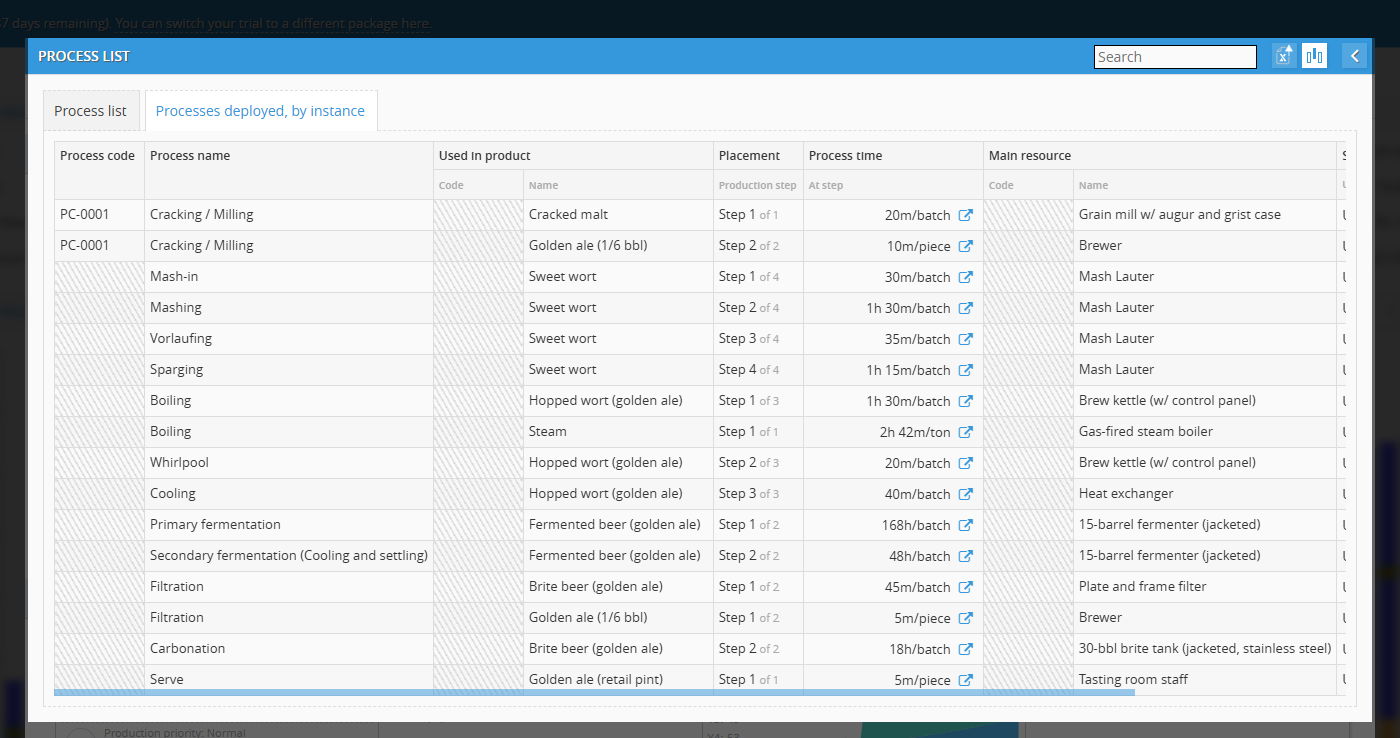
The Processes deployed, by instance tab expands every process into its specific product applications, mapping out the runtime, routing sequence, and financial cost per step:
| Column | What It Controls & Displays |
| Process code & Name |
Unique system identifier and name of the step (from Knowledge Bank). |
| Used in product |
The specific semi-finished intermediate or finished good being transformed. |
| Placement |
The sequential routing step inside that product's production recipe. |
| Process time |
The duration required per batch or per finished piece. (Click the icon to see the full process card.) |
| Main resource |
The dedicated equipment asset or staff position executing this specific instance. |
| Station cost |
The operational burn rate per minute of running that specific resource. |
| Cost accrued |
The total calculated manufacturing cost added to the batch or unit by this step alone. |
Operational Significance
- Spotting Line Bottlenecks: Comparing Process time across deployed instances immediately flags line imbalances.
- True Causal COGS: Rather than spreading direct labor and machinery costs as broad monthly averages, the system calculates exact Cost accrued per step. When batch volume increases, production expenses scale causally based on actual equipment runtime and operator touch-time.
Deep Dive: Process Details & Cost Breakdown
In the Processes deployed, by instance tab, clicking into individual table cells opens deeper operational architecture and graphical cost attributions.
1. Process Time Modal (Operational Architecture)
Clicking the pop-out icon directly beside any duration in the Process time column opens the dedicated PRODUCTION PROCESS window:
- Header & Batch Rules: Displays the active operation and its base throughput with options to toggle between TIME / UNIT and UNITS / TIME.
- Precedents: Catalogs upstream dependencies, such as required raw materials.
- Direct Labor: Shows required human operators assigned to the machinery.
- Direct Equipment: Identifies the physical machinery asset executing the step.
- Utilities: Measures specific energy and resource draw per cycle.
- Other Information: Flags operational availability states.
2. Station Cost Controls & Donut Visualizer
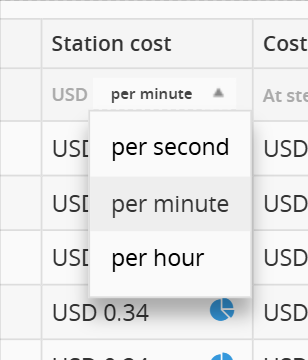
The Station cost column reflects the active operational burn rate of running that specific production node:
- Time Unit Selector: A column header dropdown toggles the baseline rate between:
- per second
- per minute
- per hour
3. Donut Visualizer in Station cost and Cost accrued
Cost Composition Donut: Clicking the blue pie-chart icon next to any rate opens the STATION COST PER MINUTE (or per hour/second) visualizer:
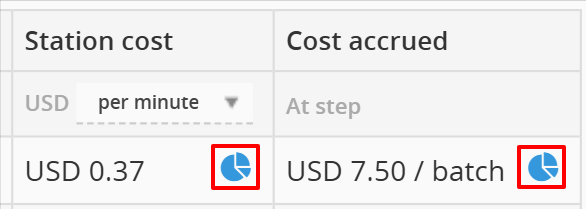
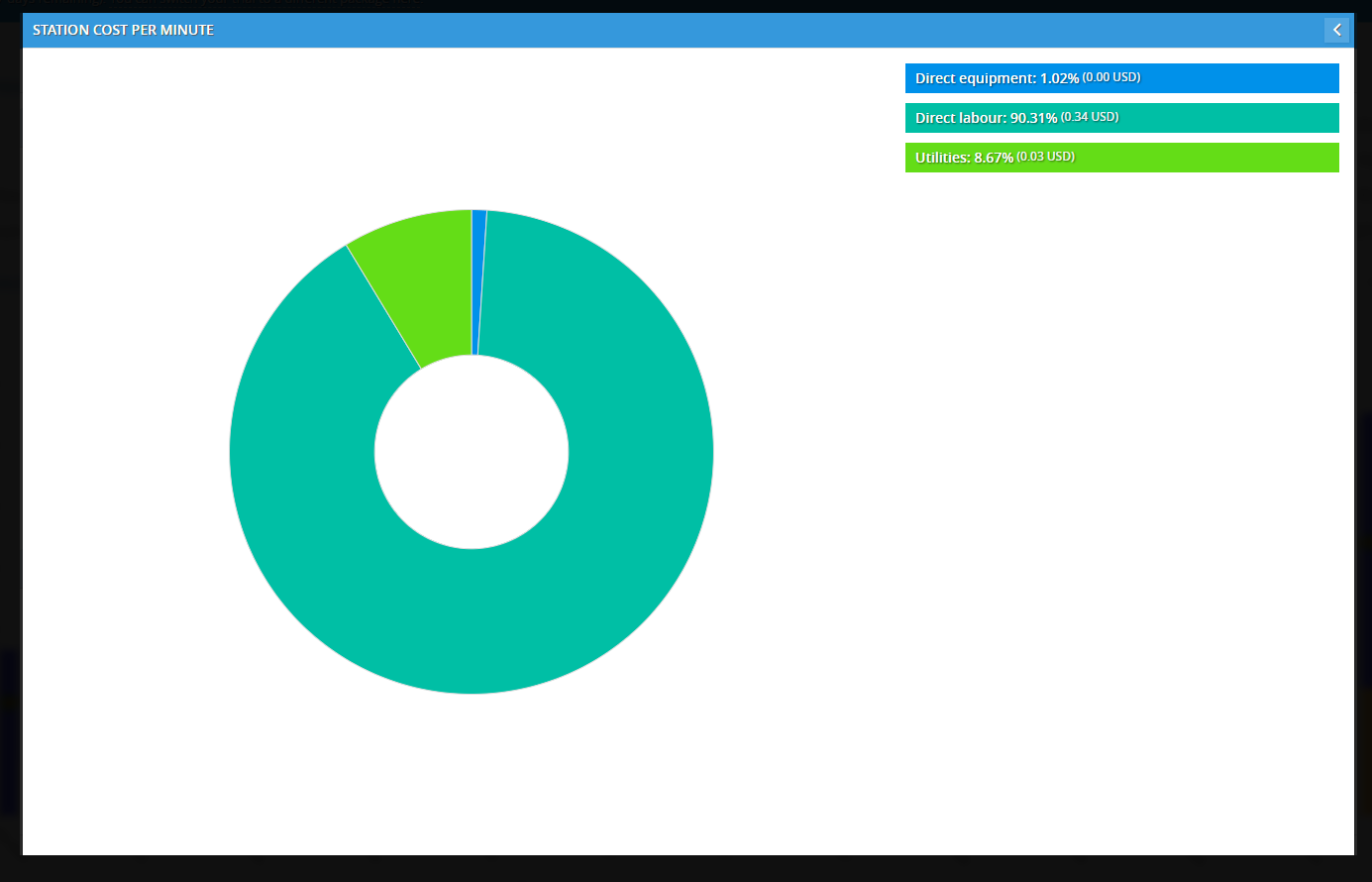
- Direct equipment: Tracks machinery write-down and direct operating fees.
- Direct labour: Quantifies direct wages and burdened payroll for assigned operators.
- Utilities: Accounts for active power, water, or fuel consumption.
4. Excel Export (Processes Deployed, by Instance)
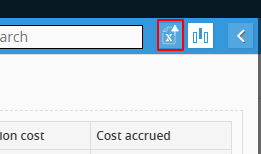
Export Icon: Located in the top-right modal header next to the search input, represented by an Excel file icon with a blue arrow (📊⤴).
Process Integration: Knowledge Bank ⇄ Scenario Model
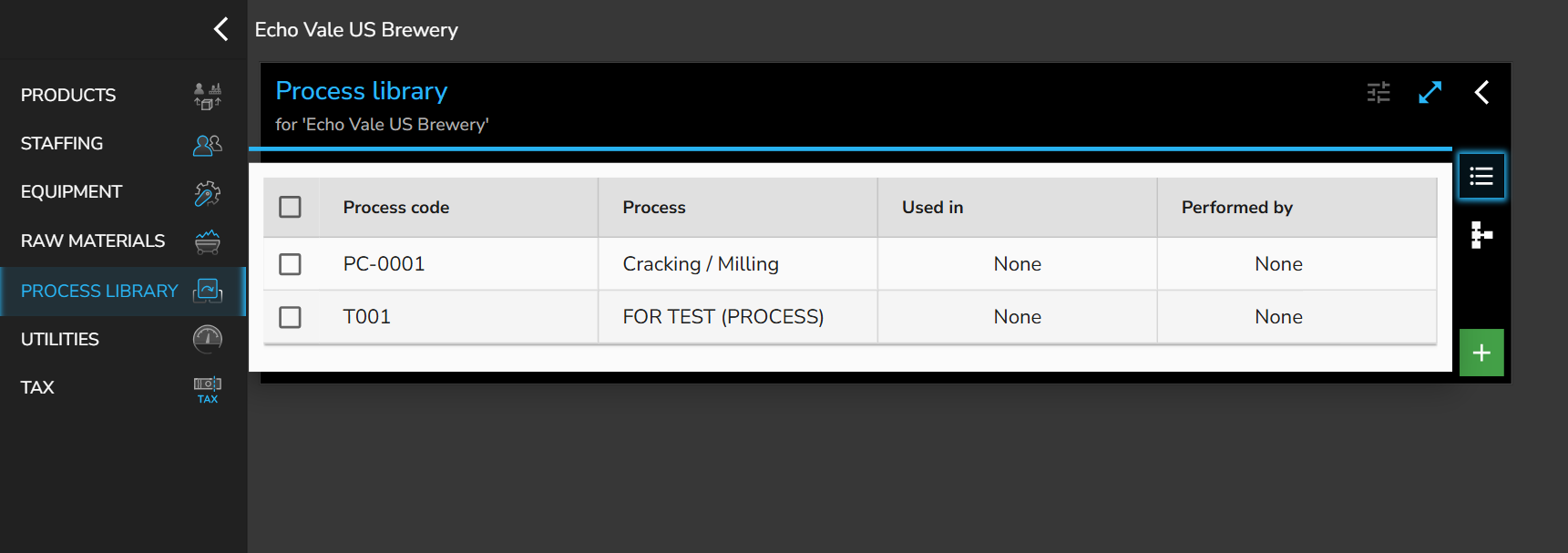
Connecting operational steps to the Knowledge Bank establishes master process templates across the enterprise. The Process library inside the KB serves as the central directory for master codes, but operational steps are created directly within active product models and synchronized dynamically.
1. Activating the Connection (Reference Selection)
Before importing or uploading, the scenario's process directory must reference the company knowledge base:
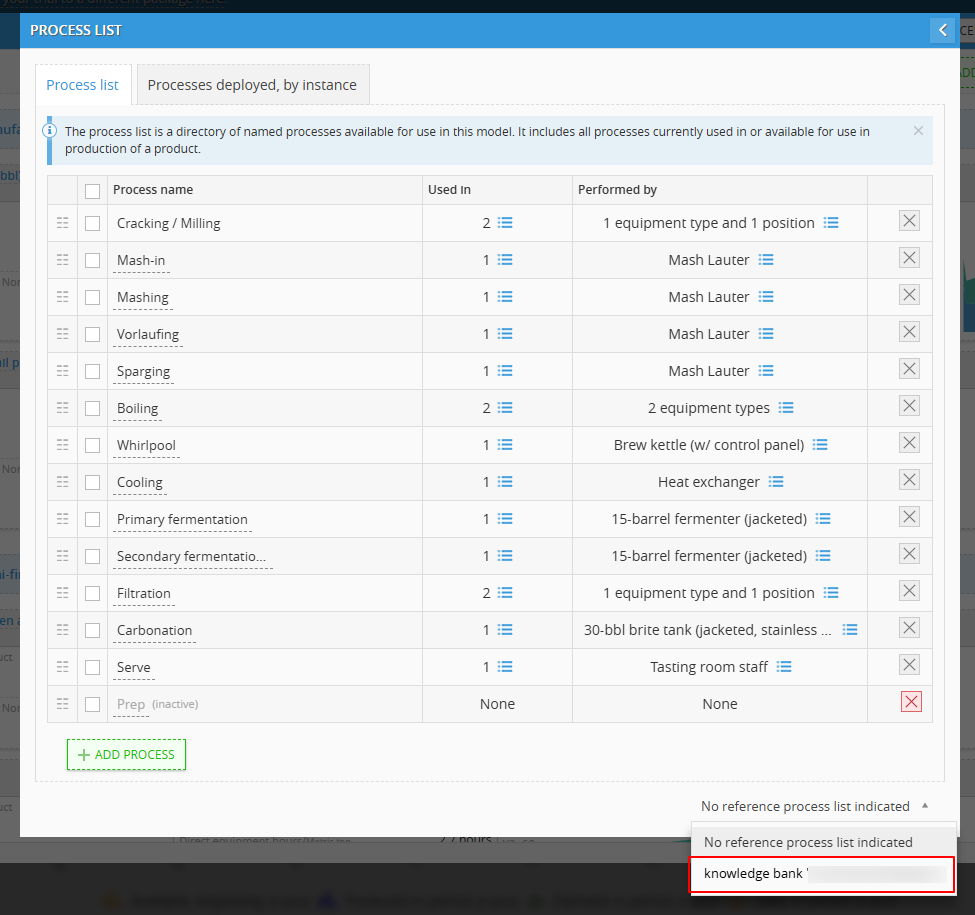
- In the PROCESS LIST modal, navigate to the footer.
- Click the dropdown menu showing "No reference process list indicated".
- Select your company's master repository (e.g., knowledge bank 'Echo Vale US Brewery').
FYI: Status Indicators & Process Codes
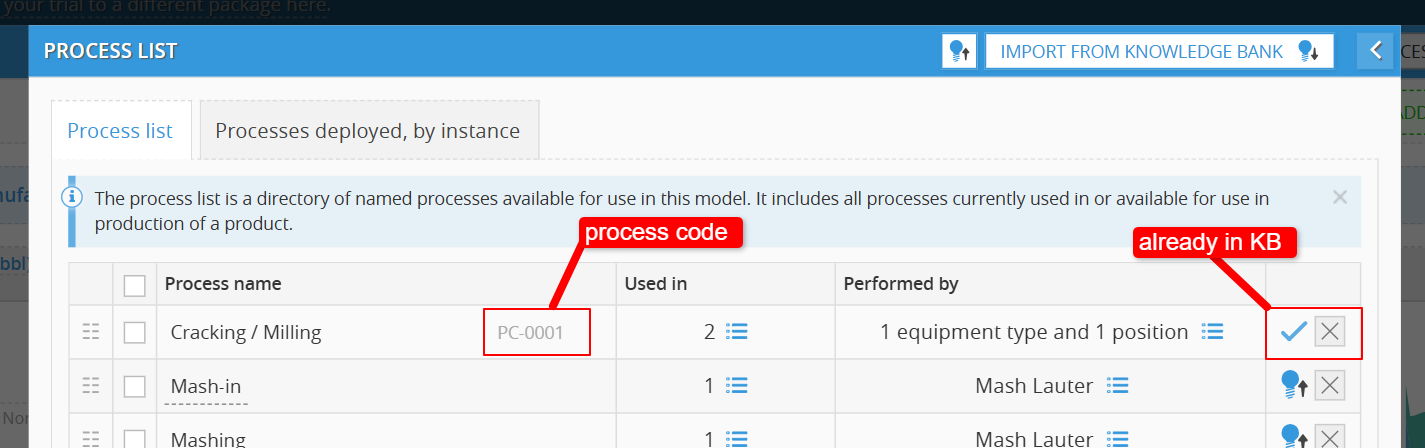
Once linked, the right side of each process row indicates its synchronization status with the Knowledge Bank:
- Synced with KB (Blue Checkmark): The process is linked to a master template. Its unique identifier appears directly beside the title in the Process name column.
- Not in KB (Lightbulb with Up-Arrow): The step exists only in the local scenario and has not been cataloged globally. No code is assigned until it is uploaded or linked to a pre-existing master item.
- Delete / De-link ([X]): Allows removing or disconnecting the operational step.
3. Uploading Processes to KB (Model ➔ KB)
You do not need to create codes manually in the Knowledge Bank before modeling. Uploading an active process generates the master code automatically:
- Upload Single Item: Click the blue lightbulb upload icon (💡↑) on the far-right side of any unlinked row (e.g., Mash-in, Boiling, or Cooling). The system registers the step in the central Process library, assigns a code, and swaps the icon to a blue checkmark.

- Upload All Items: Click the master lightbulb upload button (💡↑) located in the blue header toolbar. This bulk-registers every unlinked scenario process into the Knowledge Bank in one step.

4. Importing Processes from KB (KB ➔ Model)
When master process codes already exist in the central Process library, pull them into your operational scenario:
- Click the IMPORT FROM KNOWLEDGE BANK button (💡↓) in the top-right toolbar.

- The KNOWLEDGE BANK PROCESSES dialog displays all available templates with their master codes.
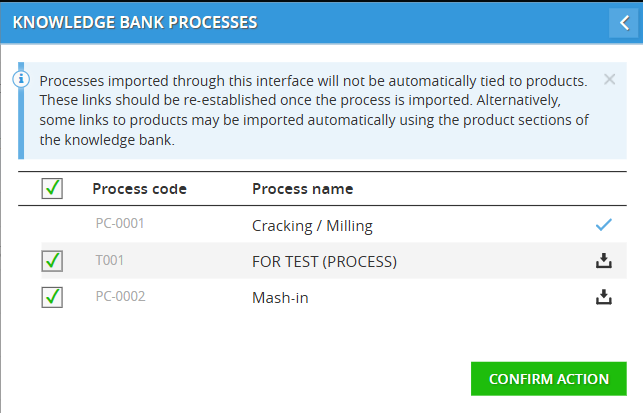
- Processes already linked display a checkmark. For unlinked items, mark the checkboxes beside the target templates and click CONFIRM ACTION.
- The templates import directly into the scenario’s active Process list.
Operational Notice: Processes imported through this interface are added as reusable named steps and are not automatically assigned to individual product recipes. Attach them to specific product routing sequences via the product cards or the Processes deployed, by instance tab.
Batch action in Product List
Updated in September 2026.
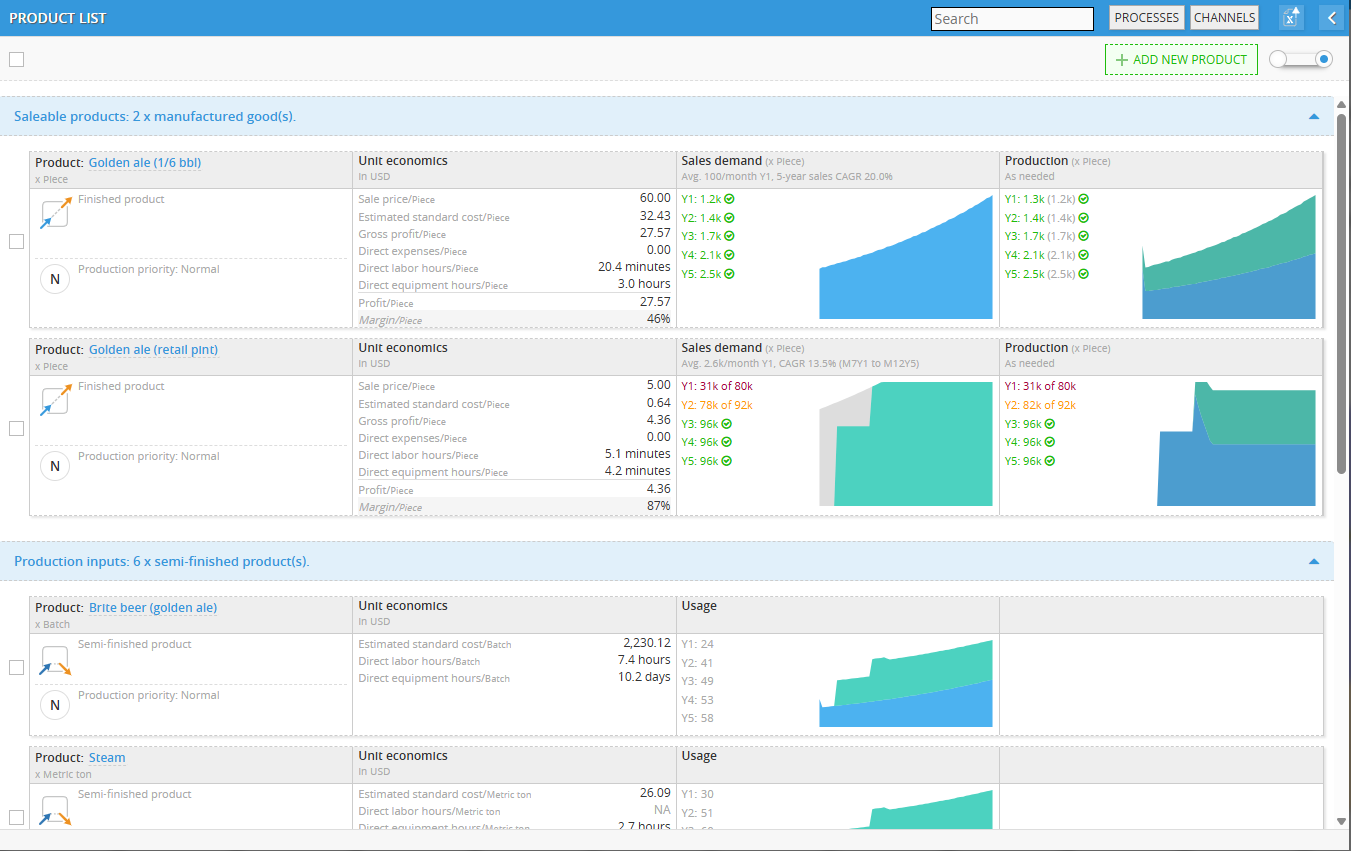
When managing catalog items in an active model, you do not need to edit or reorder products individually. Use Batch actions to execute bulk updates across finished manufactured goods and semi-finished production inputs.
Selecting Products
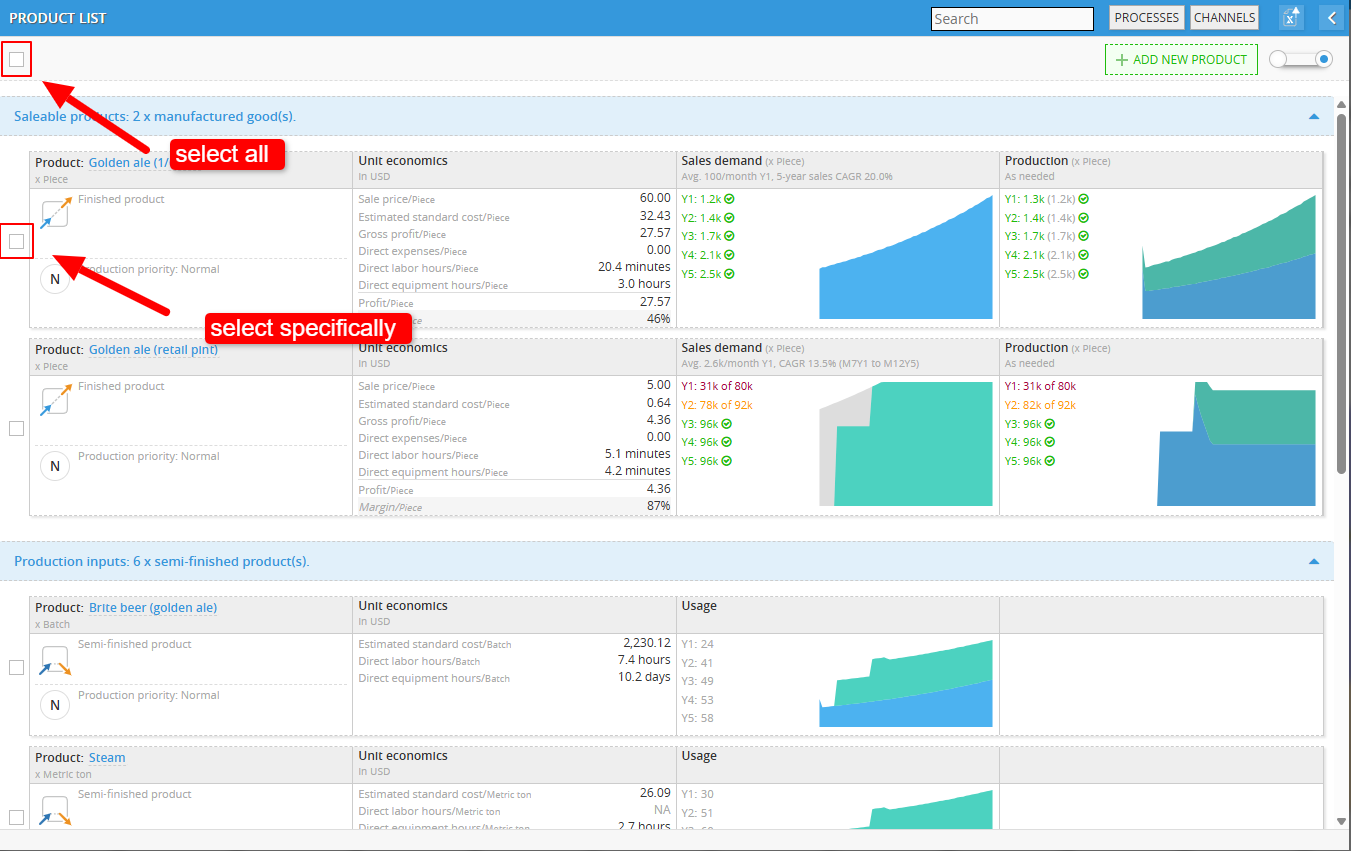
Selection controls determine the scope of bulk edits:
-
Select All: Check the master tickbox in the top-left corner beneath the window header to select every product across all categories in the list.
-
Select Specifically: Check the individual tickbox located on the far-left side of each product card.
Executing Batch Commands
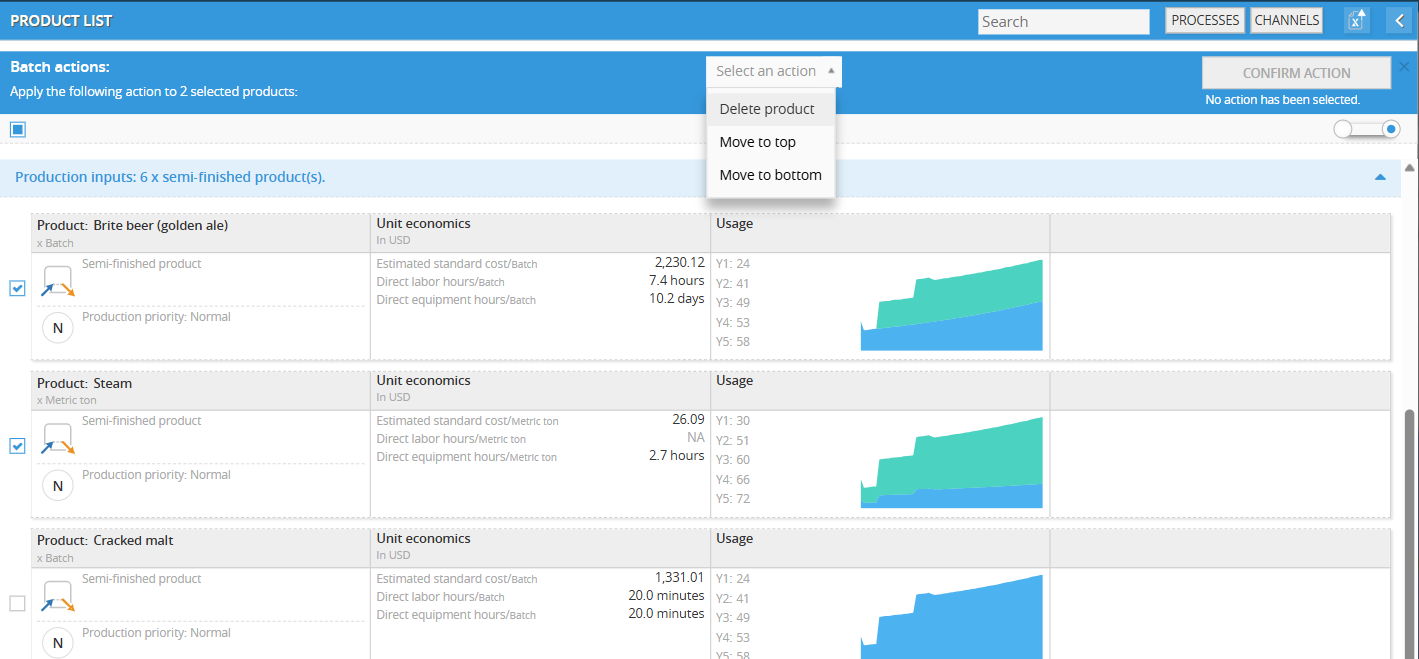
Once at least one product is selected, the top sub-header transitions into the blue Batch actions bar:
-
Selection Counter: Displays the active selection count (e.g., Apply the following action to 2 selected products:).
-
Select an Action: Open the dropdown to choose the bulk operation:
-
Delete product: Permanently removes the selected items from the model.
-
Move to top: Shifts the selected items to the top of the display hierarchy.
-
Move to bottom: Sends the selected items to the end of the list.
-
-
Confirm Action: Click the CONFIRM ACTION button on the right to commit the change.
-
Cancel / Close: Click the [X] icon on the far right of the blue bar to clear selections and dismiss the batch toolbar.
Can't find what you're looking for?
Chatting with our support team at decisioncritical.pro, or send a message to:
